This blog is managed by the content creator and not GhanaWeb, its affiliates, or employees. Advertising on this blog requires a minimum of GH₵50 a week. Contact the blog owner with any queries.
Xorlali Blog of Wednesday, 29 July 2026
Source: Xorlali Esther Kugbey
WAEC Releases 2026 BECE Results: Here's the Fastest Way to Check Yours
- Share:


The West African Examinations Council (WAEC) has released provisional results for the 2026 West African Senior School Certificate Examination (WASSCE) for Private Candidates, Second Series.
In this article, we provide a step-by-step guide on how candidates can check their BECE results online using a mobile phone from the comfort of their homes.
To check your BECE results, you will need a valid results checker voucher. Candidates and parents can buy the BECE Results Checker by dialing *713*3998# or by visiting https://buycheckercodes.com.gh/.
After obtaining your results checker voucher through *713*3998#, follow the steps below to check your BECE results online.
How to check BECE school results online
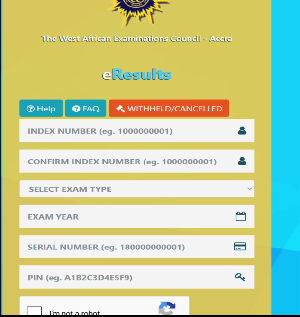
1. Visit the BECE result checking portal at https://eresults.waecgh.org/
2. Enter your Index number
3. Re-enter the Index number to confirm if it’s correct
4. Select Exam type (Eg, BECE School or BECE Private)
5. Choose the Exam year (2026)
6. Enter your Serial number (Eg, 180000000001)
7. Enter PIN (e.g., A1B2C3D4E5F9)
8. Tick the Captcha and
9. Click on the submit button and wait for a new window to display your 2026 BECE result.
How to print your BECE 2026 Results
After downloading your results onto your Android phone or iPhone, follow the steps below to print a copy:
Visit the nearest internet café or printing shop in your area.
Inform the café or printing shop attendant that you would like to print your 2026 BECE results.
Share or send the downloaded BECE results to them via WhatsApp, Bluetooth, AirDrop, or any preferred file-sharing method.
The attendant will print a hard copy of your results for your records and future school placement processes.
The management of WAEC also cautioned candidates and the public to be wary of fraudsters who claim they can upgrade results for a fee.
In this regard, candidates need to use the official checking website eresults.waecgh.org to see their examination grades.