This blog is managed by the content creator and not GhanaWeb, its affiliates, or employees. Advertising on this blog requires a minimum of GH₵50 a week. Contact the blog owner with any queries.
Xorlali Blog of Thursday, 30 July 2026
Source: Xorlali Esther Kugbey
Official Website for Checking 2026 BECE Results Online
- Share:


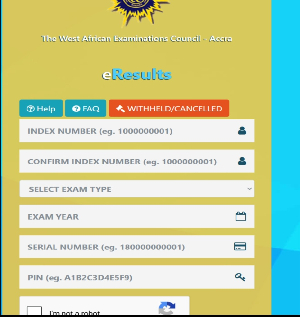
The 2026 BECE results have been published, and many parents and candidates are searching for the official website where they can check their results.
A results checker containing a Serial number and PIN is required for a candidate or parent to see their ward's examination results. A results checker can be obtained by dialing *713*5388# or visiting https://expresscheckers.com/
After obtaining a results checker, visit https://eresults.waecgh.org/, which is the official WAEC Ghana eResults portal for checking BECE results.
How to Check the 2026 BECE Results
Open Google Chrome or another updated browser.
Visit https://eresults.waecgh.org/.
Select BECE (School).
Enter your index number.
Select 2026 as the examination year.
Enter your voucher serial number and PIN.
Confirm the information entered.
Click Submit to view your results.
Avoid repeatedly clicking the Submit button when the website is slow, as each attempt may be recorded as a use of the voucher.
Finally, Candidates should avoid unofficial websites and people claiming they can change or upgrade examination results.