This blog is managed by the content creator and not GhanaWeb, its affiliates, or employees. Advertising on this blog requires a minimum of GH₵50 a week. Contact the blog owner with any queries.
Xorlali Blog of Tuesday, 4 November 2025
Source: Xorlali Esther Kugbey
How to check WASSCE results on phone 2025
- Share:


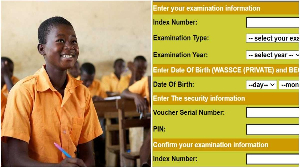
This article provides a complete guide on where to buy a results checker online and how to check your WASSCE/NovDec results at the official WAEC portal: https://ghana.waecdirect.org/.
The Code to Buy WASSCE Results Checker is *713*3998#. You can also order online from https://buycheckercodes.com.gh/
The WASSCE Checker code *713*3998# can be widely used across popular mobile money platforms, including MTN, AT, and Telecel Cash (formerly Vodafone Cash) in Ghana.
How to Buy a WASSCE Results Checker Using *713*3998#
1. Dial *713*3998# on your mobile phone
2. Select option 2: WASSCE/NOVDEC Results Checker.
3. Approve the payment by entering MoMo details.
4. You will receive the checker card via SMS.
The voucher purchased includes a unique Serial Number and PIN, which can be used to conveniently check your WASSCE/NOVDEC results online at the official WAEC portal: https://ghana.waecdirect.org/With the checker card serial and PIN, follow the guide below to check and print your WASSCE/NOVDEC results.
How to check WASSCE school and private results online
1. Visit the WASSCE result checking portal at https://ghana.waecdirect.org/
2. Enter your Index number
3. Re-enter the Index number to confirm if it’s correct
4. Select Exam type (Eg, WASSCE)
5. Choose the Exam year
6. Enter your Serial number
7. Enter the PIN you received after purchase
9. Click on the submit button and wait for a new window to display your WASSCE results.
In Person, you can obtain, results checker at the following places
Accra: WAEC National Office, Examination Loop (Behind Ridge Hospital)
Kumasi: Near Kumasi Technical Institute (KTI)
Sekondi: Near Regional Administration
Cape Coast: Adisadel Estate
Koforidua: Old Estate Road
Ho: Accra Road (Opp. SCC/Ghana Highways Authority)
Sunyani: Behind Ghana Legion/District Assembly Offices
Tamale: Kalpohin Estates
Bolgatanga: SOE Residential Area
Wa: Regional Administration
Please note that the WASSCE results for 2025 have not yet been released.
This article is intended for informational purposes only. In the event that WAEC issues an official release notice, follow the instructions in this article to check results on your mobile phone.