This blog is managed by the content creator and not GhanaWeb, its affiliates, or employees. Advertising on this blog requires a minimum of GH₵50 a week. Contact the blog owner with any queries.
Joseph Dumolga Blog of Friday, 14 August 2026
Source: Elom Joseph Dumolga
USSD Code to Check WASSCE Results in Ghana
- Share:


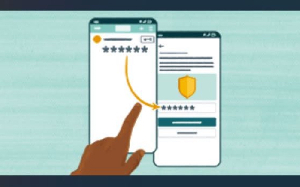
The USSD code to check your 2026 WASSCE results is *789*444#. Dial it, enter your details, and your results come to your phone by SMS.
What you need
A phone on any network (no internet needed).
A Mobile Money account.
Your WASSCE Examination Number.
The USSD code to check: *789*444#
Dial *789*444# and follow the menu:
1. Dial *789*444#.
2. Choose Instant Result Check and select WASSCE.
3. Enter your Examination Number and the year (2026).
4. Approve the Mobile Money payment.
How you get your results
Your results, and a link to download your PDF result slip, are sent to your phone by SMS. Tap the link to open, save, or print your slip.
If the code is busy
Try the backup code *714*044#, which does the same thing.
Prefer a checker to use on the portal?
If you would rather enter a Serial Number and PIN on the WAEC portal yourself, buy a WASSCE checker at buycheckersnow.com. Your details come by SMS, then check at ghana.waecdirect.org.
Your WASSCE grades explained
Grades run A1 to F9, where A1 is Excellent and F9 is a fail, and A1 to C6 are the credit passes tertiary programmes look for. This guide is for the WASSCE school candidates sitting.
Check the easy way with *789*444#, or buy a checker at buycheckersnow.com. See also our guide to buying with Mobile Money and our results release-date update.






Entertainment